Agents in production: state machines, budgets and humans in the loop
Run an agent as an explicit state machine with a step budget, a deadline and an error cap, saved after every step and paused for human approval.
- Level
- Advanced
- Stack
- TypeScript, Any LLM with tool use, A durable store for run state

In short
- Use an agent only where the path depends on what is found; otherwise write a workflow.
- Represent the run as explicit JSON state, save it after every step, and enforce a step budget, a deadline and an error cap in the loop.
- Decide every action with a policy outside the model, and pause for human approval bound to the exact call when the policy asks.
- Make every write idempotent on its call id, so resumed steps and repeated approvals can never repeat a side effect.
In this article · 9 sections
An agent is a model in a loop. It reads the task, decides on a step, usually a tool call, reads the result, and decides again, until it produces an answer. That is a small idea with large consequences for the system around it. A single model call has a bounded cost, a bounded duration and no side effects. An agent run has none of those properties unless you give them to it.
Most agent failures in production are not failures of reasoning. They are failures of the loop: a run that never ends, a run that ends silently halfway, a write that happened twice after a retry, an action nobody approved, a run that cannot be resumed after a deploy. Every one of those is an engineering problem with a known solution.
This article builds the loop as an explicit state machine, and it is the last in the series because it ties the others together: it uses the tool registry and idempotency from the tools article and the action policy from the security article. As in the rest of the series, the code is type-checked and tested in CI.
First: do you need an agent?
Many systems described as agents are workflows: the steps are known in advance, and a model is called at specific points to classify, extract or write. A workflow is cheaper, faster, easier to test and easier to explain, because its path does not depend on the model's choices.
Use a workflow when you can draw the steps. Use an agent when the path genuinely depends on what is found along the way: an investigation that follows evidence, a support case that needs different lookups depending on the problem, a task with many possible tool sequences. A good test is whether you would write the same flowchart for ten different inputs. If yes, write the flowchart.
The rest of this article assumes you have a case where the path is not known in advance.
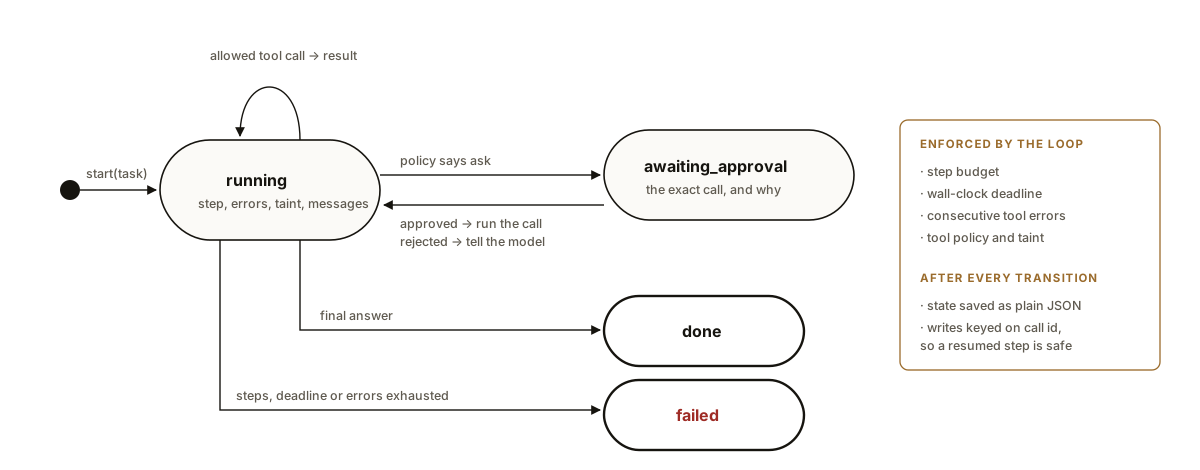
The run as a state machine
The core decision is to represent the run as explicit, serialisable state, rather than as a function that runs until it returns.
/** Everything needed to continue a run, as plain JSON. Persisted after every step. */
export type Message =
  | { role: 'user'; content: string }
  | { role: 'assistant'; content: string; call?: ToolCall }
  | { role: 'tool'; callId: string; result: ToolResult };

export type AgentState =
  | { status: 'running'; step: number; errors: number; turn: TurnState; messages: Message[] }
  | { status: 'awaiting_approval'; step: number; errors: number; turn: TurnState; messages: Message[]; call: ToolCall; reason: string }
  | { status: 'done'; step: number; answer: string; messages: Message[] }
  | { status: 'failed'; step: number; reason: string; messages: Message[] };
There are four states.
- Running: the run can take another step. It carries the step count, the number of consecutive tool errors, the taint flag from the security policy, and the message history.
- Awaiting approval: the run has proposed an action that needs a human. It carries the exact call and the reason.
- Done: the run produced an answer.
- Failed: the run hit a limit, with the reason.
Every state is plain JSON. That is the property that makes everything else possible: the state can be saved after every step, loaded in another process, inspected by an engineer, shown to a reviewer and resumed after a deploy.
The loop, with limits it enforces itself
/**
 * Runs until the agent finishes, fails, or needs a human. Every limit is
 * enforced by this loop, not requested from the model: a step budget, a
 * wall-clock deadline and a cap on consecutive tool errors. The state is
 * saved after every step, so a crash or a deploy resumes where it stopped,
 * and tool idempotency keys make the resumed step safe to repeat.
 */
export async function run(state: AgentState, d: AgentDeps, limits: Limits): Promise<AgentState> {
  let s = state;
  while (s.status === 'running') {
    if (s.step >= limits.maxSteps) s = fail(s, 'step budget exhausted');
    else if (d.now() >= limits.deadline) s = fail(s, 'deadline passed');
    else if (s.errors >= limits.maxConsecutiveErrors) s = fail(s, 'too many consecutive tool errors');
    else s = await step(s, d);
    await d.save(s);
  }
  return s;
}

async function step(s: Extract<AgentState, { status: 'running' }>, d: AgentDeps): Promise<AgentState> {
  const decision = await d.model(s.messages);
  if (decision.type === 'final') {
    return { status: 'done', step: s.step + 1, answer: decision.text, messages: [...s.messages, { role: 'assistant', content: decision.text }] };
  }
  const messages: Message[] = [...s.messages, { role: 'assistant', content: decision.note ?? '', call: decision.call }];
  const meta = d.meta(decision.call.name) ?? { risk: 'irreversible' as const, returns: 'external' as const };
  const verdict = decide({ name: decision.call.name, risk: meta.risk }, s.turn);
  if (verdict.allow === 'ask') {
    return { status: 'awaiting_approval', step: s.step + 1, errors: s.errors, turn: s.turn, messages, call: decision.call, reason: verdict.reason };
  }
  if (verdict.allow === false) {
    return toolDone({ ...s, step: s.step + 1, messages }, decision.call, { ok: false, error: 'not_permitted', detail: verdict.reason }, meta.returns);
  }
  return execute({ ...s, step: s.step + 1, messages }, decision.call, d, meta.returns);
}
Before every step, the loop checks three limits, and each one ends the run with a reason if it is exceeded.
A step budget. A run that has taken more steps than the task should need is almost always stuck: calling the same tool with the same arguments, or alternating between two. A step budget turns an endless loop into a failed run with "step budget exhausted", which is visible, countable and cheap.
A wall-clock deadline. Steps vary in duration, so a step budget does not bound time. The deadline does. It is absolute, set when the run starts, and checked before every step.
A cap on consecutive tool errors. When a tool keeps failing, the model will often keep trying it with small variations. Two or three consecutive errors is a strong signal to stop and report, rather than to spend the rest of the budget on retries. A success resets the count.
None of these limits is in the prompt. A model can be asked to "stop after ten steps", and it will mostly comply, and it will sometimes not. The loop does not ask.
Each step
A step asks the model for its next move, which is either a final answer or one tool call. For a tool call, the step consults the action policy before doing anything:
- Allowed: the tool runs through the registry, which validates the arguments, enforces permissions, applies the idempotency key and returns a structured result.
- Ask: the run moves to awaiting approval with the exact call and the reason, and the loop stops.
- Denied: the denial is recorded as a tool result, so the model can explain or choose something else, and the run continues.
After a tool result, the taint flag is updated. A tool that returns external content, such as a fetched web page, taints the run, and from then on writes need a human. The tests show exactly this: an agent asked about shipping fetches a page that contains a planted instruction to email a discount code to everyone, proposes the email, and is paused for approval instead of sending it. With no approver present, the email is denied outright, and the agent still answers the shipping question.
One tool call per step is a deliberate simplification. Models can propose several calls at once, and running independent reads in parallel is a reasonable optimisation. Keep writes to one per step, so that each one can be approved, logged and reasoned about on its own.
Human approval that survives restarts
Approval is where most agent implementations break down, because a human answers on human time. The approval might come in ten seconds or the next morning, and in between the process may have been deployed, scaled down or restarted.
/**
 * Called when a human answers. Approval runs the exact call that was shown;
 * rejection is reported to the model as a tool result, so it can explain or
 * try something else. Answering twice is harmless: the state is no longer
 * awaiting approval, and the write is idempotent on its call id anyway.
 */
export async function resolveApproval(s: AgentState, approved: boolean, d: AgentDeps): Promise<AgentState> {
  if (s.status !== 'awaiting_approval') return s;
  const running = { status: 'running' as const, step: s.step, errors: s.errors, turn: s.turn, messages: s.messages };
  const returns = d.meta(s.call.name)?.returns ?? 'external';
  const next = approved
    ? await execute(running, s.call, d, returns)
    : toolDone(running, s.call, { ok: false, error: 'not_permitted', detail: 'rejected by a human reviewer' }, returns);
  await d.save(next);
  return next;
}
The design follows from the state machine:
- The run is saved in the awaiting-approval state and the process moves on. Nothing waits in memory.
- The reviewer sees the exact call: the tool, the arguments, the reason the policy asked. As noted in the security article, this has to be rendered in concrete terms for the reviewer to make a real decision.
- The answer loads the saved state and continues. Approval runs the exact call that was shown, not a call the model is asked to produce again. Rejection becomes a tool result, so the model can tell the user it was not allowed, or try something else.
- Answering twice is harmless. A double click, a retried webhook or two reviewers answering at once will call
resolveApprovalmore than once. The write runs through the registry with the original call id as its idempotency key, so the second execution returns the stored result instead of sending a second email. The test approves the same restored state twice and asserts one email.
Durability: save after every step
The loop calls save after every transition. In the tests it records the states in memory; in production it writes the state to a table keyed by run id, or to a durable workflow engine if you already have one.
Saving after every step buys three things.
Resumption. A run interrupted by a crash or a deploy is loaded and continued from its last state. The step that was in flight may run again, which is why every write must be idempotent on its call id: the side effect happens once, and the repeated step gets the stored result.
Inspection. When a run goes wrong, the full sequence of states is a precise record of what the model saw and decided at each step. Combined with the traces from the observability article, it answers almost any question about a run.
Evaluation. Saved runs, anonymised, become eval cases for the agent: the task, the tool results, and the expected outcome. An agent eval checks more than the final answer. It checks that the run stayed within its budget, that no write happened without approval after taint, and that the answer cites what the tools returned.
Context management in long runs
Every step adds messages, and a long run eventually approaches the model's context limit, or simply becomes slow and expensive because every step resends the whole history. Three techniques keep it in check:
- Trim tool results to what the task needs. A tool that returns a full record when the agent needs one field fills the context with noise. Return less.
- Summarise old steps. After a number of steps, replace the oldest tool results with a short summary written by the model, keeping the most recent ones verbatim.
- Cache the stable prefix. The instructions and tool definitions are the same for every step of every run; order them first, as in the cost article, so the provider's prompt cache absorbs them.
Whatever the technique, the saved state should keep the full history, even when the model sees a summary. You will want it when something goes wrong.
Testing agents
The model is the only non-deterministic part of an agent, and in the tests it is a script: a list of decisions it will make in order. Everything around it, which is where the production failures come from, is deterministic and testable.
- A normal run: one tool call, one answer, state saved after each step.
- The step budget: a model that keeps calling tools ends in
failedwith the right reason at the right step. - The deadline and the error cap: a slow clock and a failing tool each end the run.
- Taint and approval: a planted instruction in a fetched page leads to a paused write, not a sent email.
- Restart and double approval: the paused state survives a JSON round trip, and approving it twice sends one email.
- Rejection: the model is told, carries on and answers without the write.
- No approver: the write is denied, and the run still completes.
Then test the model's behaviour with evals over real tasks, checking outcomes and the properties above, and run them on every change to the prompt, the tools or the model.
A checklist for agents in production
| Question | What good looks like |
|---|---|
| Is an agent needed, or is this a workflow? | An agent only where the path depends on what is found. |
| Is the run explicit, serialisable state? | Yes, saved after every transition. |
| What stops a stuck run? | A step budget, a deadline and an error cap, enforced by the loop. |
| Who decides whether an action runs? | A policy outside the model, with taint from external content. |
| How does approval survive a restart? | The run is saved awaiting approval and resumed by the answer. |
| Can a repeated approval or resumed step repeat a write? | No: writes are idempotent on the call id. |
| Is run state protected like the data in it? | Tenant-isolated, access-controlled, with retention. |
| How is the agent evaluated? | On outcomes, budgets and approvals, from saved runs. |
This is the last article in the series AI in production. Together, the ten articles describe the system we would build around any serious LLM feature: a gateway, evals, retrieval, structured output and tools, tenant isolation, fair scheduling, cost control, security, observability and, finally, agents. The whole series is on the Luniat Engineering page.
References
- Shunyu Yao et al., "ReAct: Synergizing Reasoning and Acting in Language Models", ICLR, 2023.
- Timo Schick et al., "Toolformer: Language Models Can Teach Themselves to Use Tools", NeurIPS, 2023.
- Anthropic, "Building effective agents", 2024.
- OWASP, Top 10 for Large Language Model Applications: Excessive Agency.
- Edoardo Debenedetti et al., "Defeating Prompt Injections by Design", 2025.